

Research note
What I built into my Zyxel USG FLEX 100H
The features I added to the custom firmware on my USG FLEX 100H: an attack map, a honeypot that bans attackers automatically, automations and some smaller tools. It is a personal research build and is not available.
Good fences make good neighbors.
For a long time now I've been building a custom firmware for my own Zyxel USG FLEX 100H. It's a personal research project on a firewall I own. It isn't a Zyxel release, I don't distribute it, nobody else can test it, and I'm not publishing how it's built. This post is about what it does and how the features fit together, because I'd like to hear from people who run these boxes, Zyxel engineers included.
A short video shows every feature in this post running in the real web interface: watch it on YouTube (1:35).
Each feature has a "How it works" part with the internals. Skip it if you only care about what the feature does.
Addresses in the screenshots are swapped for documentation ranges. The numbers in the text are from the box.
How every feature is built
Every feature behaves like something Zyxel shipped. It has a page in the usual menus and commands in the CLI, it respects admin and read-only accounts, and anything that could affect traffic stays off until you turn it on.
uOS, the operating system of the USG FLEX H series, is model-driven. YANG models describe the configuration of the whole device. The web interface and the CLI don't edit files: they send NETCONF requests, the device checks them against the models and stores the result in a configuration datastore (sysrepo). Python services inside a daemon called yams apply the changes, report state and answer RPCs, the one-off commands such as "run a ping".
My one rule was that every feature has to plug into that machinery the way a stock feature does. Each one ends up as four pieces:
- a YANG model with its configuration, its state and its RPCs;
- a yams service that applies the configuration and answers the RPCs;
- a page in the native React interface, in the menu where you'd look for it;
- a small daemon, only when the feature needs to work in the background.
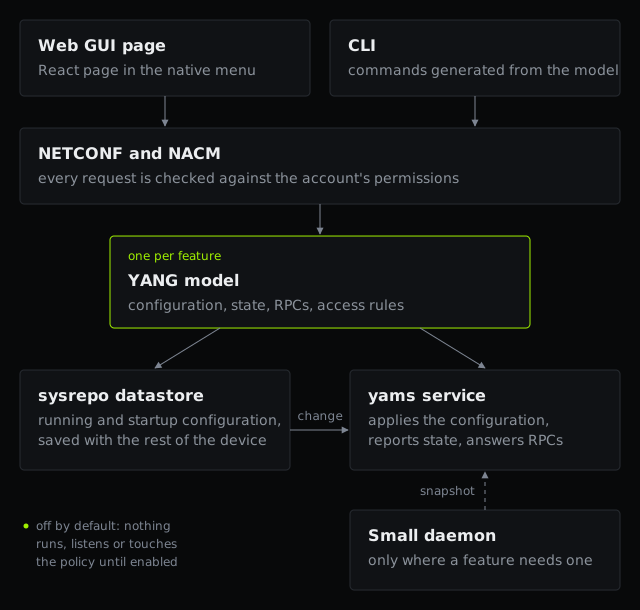 How a feature plugs into uOS: one YANG model, a yams service, a native page and the CLI
It's more work, but:
- uOS generates its CLI from the same models, so a feature has commands as soon as its model exists.
- NACM, the access control the device already uses for its own accounts, covers the new RPCs too. Anything that changes state or shows captured data is marked
default-deny-allin the model. A read-only account gets "access denied" from the device itself, and I didn't write that check. - Configuration lives in the same datastore as everything else and is saved with the rest of the device.
- Anything that opens a port, sends traffic out or touches the security policy defaults to off. A feature that's off runs nothing.
The pages use the native layout and both themes, next to the stock entries.
Attack Map
The firewall drops traffic all day, and the stock interface shows it as log lines. I wanted to see where it comes from and what it aims at.
 The Attack Map: blocked connections, sources and countries over 24 hours, with the top countries, ports and targets
The page sits under Security Statistics: blocked connections, unique sources and countries for the last hour or day, a world map shaded by volume, the most targeted ports and addresses. Each new block shows up as a short animated line from its country to the firewall's. Click a country and you get its share, its ports, a 24 hour timeline and the latest entries.
I keep it open on a second screen. Attacks show up while they happen, not hours later when I get around to the log.
How it works
A collector daemon reads the system log buffer every five seconds and keeps what the firewall's own log library classifies as blocks. Today that means drops by the default rule. Private and reserved sources are skipped, the country comes from the geo-IP service the device already runs, and counts are kept per minute for 24 hours, in a small JSON snapshot in RAM.
The yams service behind attackmap-show only reads that snapshot. yams is one process serving the whole configuration plane, and I don't want a log parser running inside it. If the collector crashes, the map goes stale and systemd restarts it.
A scan from a large botnet can produce a lot of unique keys, so I capped memory: 1,440 minute buckets, and a global cap of 200,000 keys for addresses and ports. Past the cap, totals and per-country counts stay exact. The world map ships with the interface, and the page loads nothing from outside the box.
Web Console
The stock Web Console opens the CLI in a new browser window, and I kept losing it behind other windows. Now it opens inside the page.
 The Web Console as a floating window over the Attack Map
It floats, docks to the bottom or the right edge, minimizes to a small pill or maximizes. Because the window is plain DOM attached outside the React tree, it stays open while you move between pages: you read a configuration page and type the matching command under it. Docked, it shrinks the interface instead of covering it.
 The Web Console docked under the Attack Map, after show version and a ping
It's the same stock console, framed in the page. Closing the window removes the frame, which ends the session cleanly and skips the browser's "Leave site?" prompt. Position and size are remembered in the browser.
Cloudflare Tunnel, now with a status page
I wrote about the tunnel itself in A Cloudflare Tunnel inside my Zyxel firewall. Its configuration page holds a switch and a token, and it could only tell me "Connected" or not.
The new page sits under Monitor, VPN Status, next to IPsec, SSL VPN and Tailscale. It's read-only: state, uptime and connector version, the tunnel and connector IDs, each connection to the Cloudflare edge with its data center, protocol, round-trip time and bytes, and the requests served with their response classes. It refreshes every ten seconds. On my box the four connections land in Rome and Milan.
 The Cloudflare Tunnel status page in dark mode, with four edge connections and the traffic served
Where the numbers come from
The connector already publishes its metrics on a loopback-only port. A new read-only RPC, cftunnel-show, in the existing tunnel model, reads two of those endpoints: a JSON description of the tunnel and the Prometheus metrics. Everything stays on the device, and no new port opens. Reading and parsing takes about 60 milliseconds on the box.
The page parses another program's output, so I wrote it defensively:
- each endpoint gets a two second deadline on the socket, the whole RPC five seconds, no redirects, and a size limit;
- IDs, versions and addresses must match a strict pattern, and numbers outside a sane range are dropped;
- a metric the connector doesn't publish stays empty. There's no lost-packets metric, for example, so the table shows bytes in and out;
- the service never reads the token. It only checks whether the tunnel is configured.
The state is off, starting, connected or down, with a short grace period after the connector starts so a restart doesn't look like a failure.
Honeypot
This is the feature I spent the most time on.
Every address on the Internet gets probed for Telnet, SSH, RDP and SMB, mostly by bots trying default passwords. The firewall drops those probes. The honeypot answers some of them with fake services, records what the bots try, wastes their time, and bans the ones that go far enough on every port at once.
 The Honeypot page: counters, live sessions, a session replay, the decoys and the most tried credentials
It lives under Security Policy. There are five decoys, each with its own switch and a mode, "Tarpit + ban" or "Log only":
- SSH on port 22: a real SSH handshake with a stock-looking banner, password logins, then a fake shell;
- Telnet on port 23: a router login prompt and the same fake shell;
- RDP on port 3389: answers the start of the handshake, records the name the client announces and never completes;
- HTTP on port 8080: a fake router login page that records what's requested and posted, and always says the login failed;
- SMB on port 445: held open and logged, and turned off automatically if a port forward already uses 445.
The fake shell imitates the minimal Linux on cheap routers and cameras (BusyBox) well enough to keep a bot talking: uname, /proc/cpuinfo, id, a few common commands. Downloads with wget, curl or tftp fail with "Network is unreachable". The URL goes into the log, written as hxxp:// so nobody clicks it by mistake. Nothing the bot types is ever run, and a file it tries to send is never saved. The decoys can't open a connection to anywhere.
The decoy eventually accepts a login, so you see what the bot does next. The tarpit answers slowly and holds the connection for as long as you allow, which keeps a bot busy for minutes on a socket that costs the firewall almost nothing. That's what "Attacker time wasted" adds up.
Every session can be replayed at 1x, 4x or 16x, ban included:
 A Telnet session replayed: the bot logs in, tries a few commands and is banned for 24 hours
You choose when to ban (after the first connection, after 3 or 10 login attempts, or never) and for how long (1 hour, 24 hours, 7 days or until removed). A banned address is dropped on every port and towards every zone, the firewall included.
The first afternoon
I switched the honeypot on in the middle of an afternoon. Within minutes a real Telnet session was in the log. Within 30 minutes two hosts had tried three Telnet logins each and were banned for 24 hours, and the two deny rules had appeared at the top of the policy. Less than three hours later, ten addresses were banned.
That is what I wanted from it: whatever comes after the firewall gets blocked, and I never write the rule myself.
I'm not publishing the addresses. They're bots on compromised machines.
How it works
A honeypot talks to hostile clients and parses whatever they send, so I assumed the decoy code would one day have a bug and designed around what that bug could reach. The honeypot is two processes with very different rights.
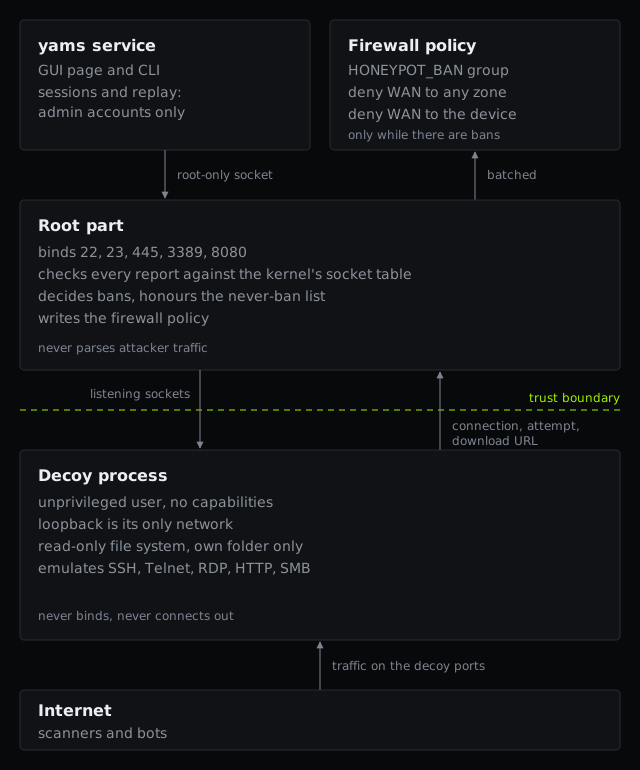 The honeypot's two halves: the root part above the trust boundary, the decoy process below it
The root part binds the decoy ports, decides bans and writes the policy. All it ever reads from the other side are short, size-checked reports, never attacker traffic.
Everything that touches attacker bytes happens in the decoy process. It runs as its own user with no capabilities, in a private network namespace whose only interface is loopback, with a read-only view of the file system except its own data folder. It can't see the device configuration or keys, and it has hard limits on memory and tasks.
Socket passing joins the two. Root opens the listening sockets and hands them over a local Unix socket. A socket keeps the namespace it was created in, so the decoy process accepts WAN connections on them, while any socket it opens itself sees nothing but loopback.
What comes back is three kinds of report: a connection, a login attempt, a download URL. Root checks them. A connection only counts if root finds it in the kernel's socket table, and a login attempt only counts for a source whose connection it already verified. So a decoy process taken over by an attacker could, at worst, get addresses banned that really did connect to a decoy, and nothing else. The link is bounded too: one JSON object per line, size and nesting checked before parsing, a rate limit, and a malformed message closes it.
Inside the decoys every protocol has caps, from the bytes an SSH client may send before authenticating to the number of sockets one source can hold. The SSH decoy is a small SSH-2 server written for this on the cryptography library already on the device. No new dependencies.
Bans on every port
Bans go into an address group, HONEYPOT_BAN, used by two deny rules at the top of the policy: one for traffic from the WAN to the zones behind the firewall, one for traffic to the firewall itself, which the policy treats as a zone of its own. Both rules and the group appear with the first ban and disappear with the last, so an unused honeypot leaves nothing behind. A third rule lets the WAN reach the decoy ports while the honeypot is on. Switching it off removes that rule, closes the decoys and keeps the bans until you clear them.
Safeguards
A ban is the one thing here that can hurt the owner. Root won't ban private or reserved addresses, anything in the never-ban list (the page warns while it's empty), an address with an open session to the web interface, SSH or the SSL VPN, or an IPsec peer.
The group holds at most 128 members, the number uOS activates in an address group. A commit takes seconds on this hardware, so policy changes go out in batches, at most one a minute, under a lock shared with the automations. At every start the daemon re-creates its rules and bans if the honeypot is on.
The sessions and replays contain every credential and command the bots typed, so the RPCs that return them are default-deny-all. Read-only accounts still see the counters.
Automations
I wanted the firewall to tell me a few things without opening the logs: a message on my phone when the WAN goes down, a block for an address that keeps hammering, my PC awake at 8:30 on weekdays.
If you want to keep an eye on everything in real time, this is the part that does the watching for you.
 The Automations page with its four example rules, one just enabled in dry run, and no channels set up yet
Rules on the Automations page, under Security Policy, read as sentences: WHEN something happens, ONLY IF a condition holds, THEN do something.
Triggers come from the other features: the WAN down for some minutes, latency above a threshold, an address blocked more than N times in ten minutes, a spike from one country, a honeypot ban or download URL, a new device on the LAN, a time of day. Conditions are a time window and the source country. Actions come from a fixed list. You can notify by Telegram, by ntfy (a push notification service) or by e-mail, or call a URL of your choice (a webhook). You can block an address for a while or a download host outbound, wake a device, or attach the output of a ping or traceroute.
 The rule editor: when the honeypot sees a download URL, block that host outbound for 7 days and notify on Telegram
Each rule has a cooldown, so a flapping line sends one message. New rules spend their first 24 hours in dry run, logging what they would have done. The examples arrive switched off and in dry run, and "Test with a sample event" tries a rule with no side effects. If the WAN is down, notifications wait in a queue and go out when it's back.
How it works
Same split as the honeypot: the part that reads outside data and talks to the Internet can't change the firewall.
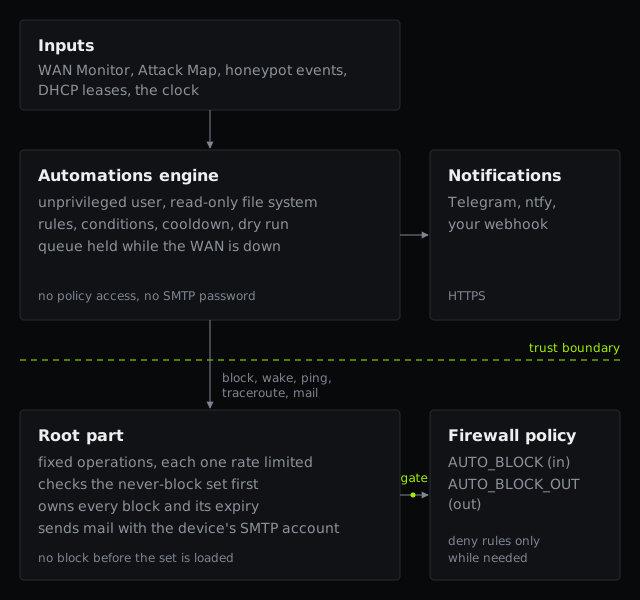 Engine on top, root part and the never-block gate underneath
The engine runs as an unprivileged user on a read-only file system and does the rules, cooldowns, queue and HTTPS calls. Before it sends anything, it resolves the host name and checks every address it gets back. Private, loopback, link-local and carrier-grade NAT ranges are refused, and so are the device's own addresses. Then it connects to the address it checked. A webhook can't be aimed at the LAN or at the firewall. Plain HTTP needs an explicit opt-in.
Root offers a short list of operations (block, wake, ping or traceroute, send an e-mail), checks every argument again and rate-limits each one. Mail goes through the SMTP account already configured on the device, to a recipient set from the admin interface. The engine can only ask "send this subject and body". The SMTP password stays with root. Channel secrets sit in a folder only the engine can read and always show masked.
Blocks go into AUTO_BLOCK (inbound) and AUTO_BLOCK_OUT (outbound), with three deny rules that exist only while a group has members. They expire by themselves, even while the engine is stopped. The caps are tight: 128 entries per direction, at most 16 new outbound entries a day and seven days per outbound block, and a block triggered by an Attack Map count needs a threshold of at least five. Remove an entry by hand in the stock policy pages and root treats it as unblocked.
The never-block set
This is what keeps a rule from cutting off the firewall's own lifelines. Root enforces it in both directions and logs every refusal with the reason. It holds:
- well-known public DNS resolvers and the WAN Monitor targets;
- the DNS and NTP servers the device uses, and its gateways;
- every address of the device itself;
- the Cloudflare Tunnel edge, the published ranges and the live peers;
- the Zyxel cloud endpoints the device depends on;
- IPsec peers and any source with an open admin session;
- your own list.
Some of these change at runtime, so the set is rebuilt periodically. A block issued before the set is ready could hit exactly what it protects, so root refuses to block until it's loaded. Right after a start, the first block waits; if the set isn't ready in time, the block is refused and retried.
The page is admin-only, automations-show included, because the activity log shows addresses, rule names and notification targets.
WAN Monitor, Speed Test and Wake-on-LAN
Three smaller tools, built the same way.
WAN Monitor
When the Internet feels slow I want to know whether it's the line. The WAN Monitor keeps the history: under Network Status, it pings 1.1.1.1 and 8.8.8.8 from every WAN interface every ten seconds and shows median latency, jitter, loss and outages for 24 hours or 7 days.
 The WAN Monitor for one WAN link: latency, jitter, loss and outages over 24 hours
Surviving a reboot and a wrong clock
The daemon reads the WAN interfaces from the zone configuration and binds each ping to its interface, so two WAN links are measured separately. One record per minute and interface keeps the median round-trip time, the loss, and whether the minute had no reply or the link was down. Seven days stay in RAM. Once an hour they're saved compressed to flash, at most about 1.5 MB of writes a day, which limits flash wear and loses at most an hour on a power cut. While the clock is behind the last save, as on a boot before NTP, the daemon records nothing, so history never lands in the wrong place.
Speed Test
A new tool in Maintenance, Diagnostics, Network Tool, next to ping and traceroute. It measures latency, download and upload against Cloudflare's speed test from the WAN interface you pick, and lists only WAN interfaces because the point is the Internet link.
 Speed Test in the Network Tool tab, run from ge1 against Cloudflare
It works like its neighbors: one RPC starts the test in the background and the page polls the result every second.
Wake-on-LAN
Under Network, a list of the devices the firewall knows from DHCP, plus any you add by MAC address, each with a Wake button.
 Wake-on-LAN: known and added devices, each with a Wake button
Keeping the list across reboots
Lease files live in temporary storage and vanish at reboot, so favorites and added devices are kept with their names and MAC addresses on the device's persistent storage. "Online now" comes from the ARP table. Wake only works on LAN-zone interfaces, with a validated MAC and a rate limit, and the magic packet is a broadcast bound to the chosen interface. The automations reuse the same path for "wake a device".
What it costs
The 100H is a small box and it's busy even when idle. With everything enabled:
- the four honeypot and automations processes use 22 to 26 MB of resident memory each and 0.0 to 0.2 percent of CPU;
- the load average didn't move when I enabled the honeypot;
- the Cloudflare connector uses about 22 MB.
The daemons run at lower priority, the services carry memory limits, every in-memory table has a cap, and nothing polls in a tight loop. A flood of connections hits the decoy process's own memory ceiling before it can take memory from the firewall.
What this says about uOS
I didn't have to invent any architecture: every feature reuses something uOS already had, from the zone configuration and address objects to the geo-IP service, the SMTP account, NACM and the CLI generator. Most of the work went into the daemons and the privilege boundaries.
Questions for Zyxel and the community
I'm not offering it. I'd like to know whether these use cases belong on the platform:
- Would you use any of these features on a FLEX H if they were native? Which ones, and for what?
- For the honeypot: would you expose decoys on a production firewall at all? What would you need to trust it?
- For the automations: which triggers and actions are missing, and which should never exist on a firewall?
- Is the Attack Map useful beyond looking good, or would you rather have the same data as reports?
- Anything in the design you'd object to?
The feature request for Cloudflare Tunnel is open on the Zyxel Community: Feature request: native Cloudflare Tunnel (cloudflared) on USG FLEX H.
If this writeup saved you an evening, you can buy me a coffee.
Buy me a coffee